Merry Mulberry: A Full-Color Font with a Floral Heart
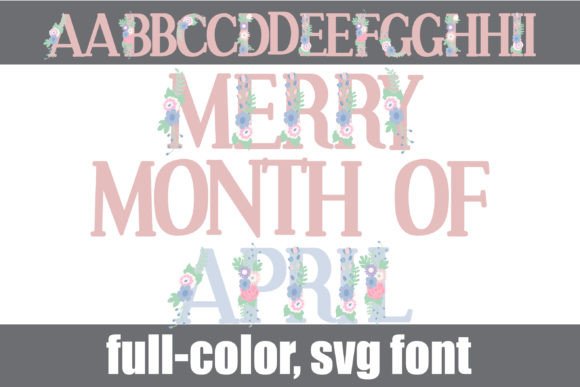
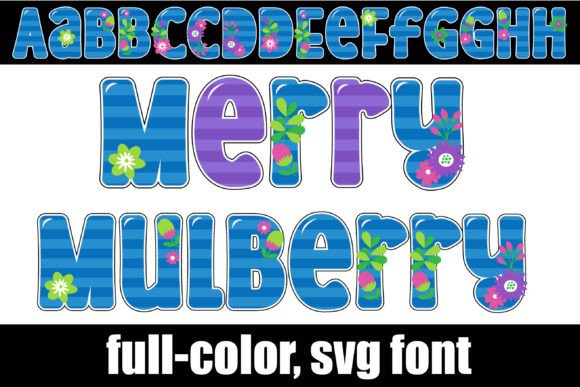
Sometimes a design calls for more than just words on a page. It asks for a personality, a vibe, a little bit of magic. That’s exactly where the Merry Mulberry typeface comes in. This isn't just another script font or a standard serif; it's a premium, full-color SVG font that weaves beautiful, vibrant florals directly into a charming, striped base. Imagine your headlines not just spelling out a message, but blooming with color and texture right from the start.
The Personality and Practicality of a Color Font
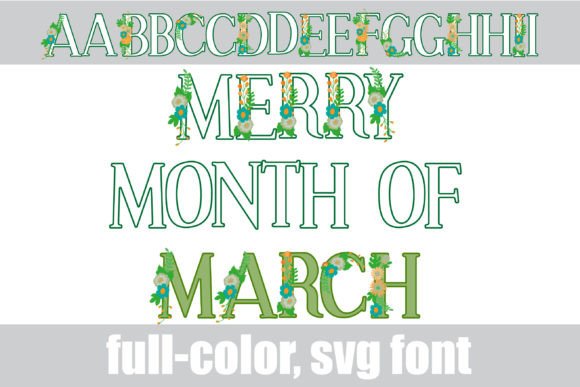
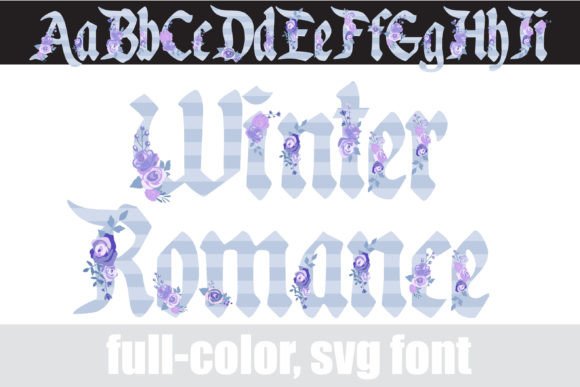
At its core, Merry Mulberry is a display font with a playful, feminine, and artistic personality. The letters themselves have a friendly, slightly rounded serif structure, but their defining feature is the intricate floral decoration and the underlying striped pattern. The default colorway offers a lovely palette, but the real fun begins with the alternate glyphs. By accessing your system's character map or using a program like Silhouette Studio, you can unlock additional color variations, giving you surprising versatility from a single typeface.
Because it's an OpenType full-color (SVG) font, it installs like any standard .otf file. The key thing to remember is compatibility. While you install it through FontBook on a Mac or your font manager on Windows, it will only show its true colors in programs that support SVG fonts. In non-compatible software, it will appear as a solid black silhouette. This is normal. When you're choosing the font in a menu, it might also preview in black, even in compatible apps. The real test is typing it out in your document. If you see the florals and stripes in color, you're good to go. Adobe Illustrator, Photoshop, InDesign, Silhouette Studio, Quark, and Inkscape are all on the list of programs that can handle this modern typography asset.
Where Merry Mulberry Truly Shines
Understanding a font's strengths is key to using it effectively. Merry Mulberry isn't for body copy; it's a specialist. Its detailed nature and inherent color make it ideal for projects where impact and first impressions are everything.
Think logo design for a boutique brand, a floral studio, a wedding planner, or a lifestyle blog. The font does half the design work for you, instantly communicating a sense of elegance and creativity. For packaging design, it can make a product label for artisan goods, cosmetics, or gourmet treats leap off the shelf. In editorial design, use it for pull quotes or section headers in a magazine or lookbook to inject personality without overwhelming the page.
Digital applications are where it truly excels. Social media graphics become instantly more eye-catching and shareable. Use it for Instagram story titles, YouTube thumbnail text, or Pinterest pin headers. For web design, it can be a stunning choice for hero section headlines or special announcement banners, though you'll need to test its file size and loading impact. For crafters and hobbyists, it's a dream for creating custom invitations, greeting cards, and personalized gifts on platforms like Silhouette or Cricut.
Integrating a Creative Font into Your Brand Identity
Using a creative font like Merry Mulberry is about more than just aesthetics; it's a strategic choice that influences how your audience perceives your brand. The right typeface can shape brand perception, guiding the viewer to feel a certain way before they even read the word. Merry Mulberry suggests a brand that is artistic, thoughtful, and perhaps a bit whimsical. It builds recognition through its unique and memorable character.
However, its power lies in contrast and hierarchy. You would never set a long paragraph in this script font style. Instead, use it as your headline act. Pair it with a clean, neutral sans serif font for body text, or a simple, readable serif font for a more classic feel. This creates a clear visual hierarchy, guiding the reader's eye and ensuring readability. The floral display font grabs attention, and the supporting typeface delivers the detailed information comfortably.
A Practical Guide to Choosing and Using Merry Mulberry
Before you commit, evaluate the fit. Does the playful, floral personality align with your project's tone? It's perfect for a spring campaign or a wedding suite but might feel out of place for a corporate law firm or a tech startup's main branding. Always test it in context.
Here are a few practical steps:
- Test Font Pairings: Don't just look at the font in isolation. Set your proposed headline in Merry Mulberry and your body copy in a few different options. See how they interact. A font like Lato, Open Sans, or even a classic like Garamond can provide a beautiful, stable foundation.
- Review All Styles: Don't forget the alternate glyphs. Accessing those additional color options can completely change the feel, allowing you to match different color schemes or seasons.
- Check Licensing: For any commercial project—from client work to selling products on Etsy—ensure you have the correct commercial license. This protects you legally and supports the font designer's work.
- Mind the Scale: As a vector-based SVG font, it scales infinitely without quality loss. This means it will look crisp on a business card and stunning on a poster. However, at very small sizes, the intricate floral details might become muddled. Use it at larger sizes where its details can be appreciated.
In the end, Merry Mulberry is more than just a font; it's a design asset. It's a tool for adding instant personality, color, and artisan flair to your work. By understanding its character and using it strategically within your brand identity or project, you can create designs that feel genuinely special and connect with your audience on a more personal level. It’s a perfect example of how modern typography can be both functional and deeply expressive.