Bring Your Designs to Life with Spring Marquee
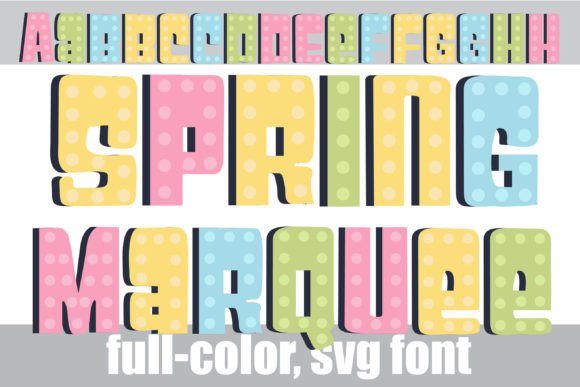
Finding a premium font that captures a specific mood without feeling generic can be a challenge. Spring Marquee is a creative font that immediately brings a sense of whimsy and celebration to any project. This isn't just another display font; it's a full-color SVG typeface that combines a classic marquee style with a fresh, pastel color palette. Think of the bulb-lit signs of old carnivals and theaters, reimagined with a soft, springtime touch. The letters are crafted with a playful, circus-inspired flair, making them perfect for designs that need to grab attention and convey joy.
Understanding the Visual Appeal and Versatility
The true magic of Spring Marquee lies in its built-in personality. Each letterform is designed to look like a miniature marquee sign, complete with a colorful, pastel finish. This typeface is far from a one-note trick, though. It includes an alternate case of additional letter variations. Accessing these through your system's character map or a program's glyph panel allows you to mix and match, creating a more organic, hand-lettered effect that avoids repetitive patterns in headlines. This level of customization is a significant advantage for logo design and brand identity projects where uniqueness is paramount.
As an OpenType full-color font, Spring Marquee installs like any standard .otf file. However, its colorful nature has a few technical considerations. In programs that don't support color fonts, it will render as a solid black silhouette. Even in compatible software, the preview window might show it in black. The true test is typing on your canvas. If you see the vibrant pastels, you're set. Major creative suites like Adobe Illustrator, Photoshop, Silhouette Studio, Quark, and Inkscape fully support these SVG fonts. This wide compatibility makes it a reliable design asset for professionals and hobbyists alike.
Where Spring Marquee Truly Shines
This font excels in projects where personality and impact are key. Its vector-based nature means it scales perfectly for both tiny social media icons and large-format prints. Consider using Spring Marquee for:
- Event Branding: Perfect for spring festivals, children's parties, boutique markets, or celebratory announcements. It sets an immediate tone of fun and festivity.
- Product Packaging: Ideal for artisan goods, bakery items, candy shops, or any product that wants to communicate a handmade, joyful quality. It can make packaging pop on a shelf.
- Digital & Social Media: Creates eye-catching Instagram stories, YouTube thumbnails, blog headers, and promotional graphics that stand out in a crowded feed.
- Editorial & Publishing: Works beautifully for chapter titles in lighthearted books, magazine features on lifestyle topics, or newsletter banners that need a burst of energy.
- Personal Projects: Elevates DIY crafts, greeting cards, party invitations, and scrapbooking with a professional, colorful touch that's hard to achieve manually.
Practical Guidance for Effective Use
While Spring Marquee is a standout creative font, using it effectively requires some strategy. Its strength is in display settings—large headlines, logos, and short phrases. Using it for body copy would sacrifice readability due to its intricate style. The key is to let it be the star. Pair it with a clean, neutral sans serif font or a simple serif font for supporting text. This creates a strong visual hierarchy, ensuring your main message is both seen and understood.
When evaluating its fit for a project, consider your audience and message. Is the tone celebratory, whimsical, or artisanal? If yes, Spring Marquee could be an excellent choice. For more corporate or serious contexts, it might not align. Always test it within your actual design mockup. See how the colors interact with your background and other design elements. Remember, the goal is brand perception that feels authentic and engaging.
From a practical standpoint, review the full character set. The alternate glyphs are not just extras; they are essential tools for achieving a custom look and ensuring consistency in your brand identity. Finally, check the licensing for your intended use. Most premium fonts, including Spring Marquee, come with clear commercial licenses, but it's crucial to verify the terms match your project scope, especially for large-scale commercial applications.
Maximizing Impact with Font Pairings and Context
The right pairing can make Spring Marquee even more effective. A geometric sans serif font like Montserrat or Lato provides a clean, modern counterbalance. A classic serif font like Garamond or Libre Baskerville can add a touch of tradition and sophistication. Avoid pairing it with other highly decorative script fonts or handwritten fonts, as this can create visual chaos and undermine readability.
Think about the context of your design. In web design, use it for hero section headlines or call-to-action buttons where you want immediate impact. In packaging design, consider how the font will look on different materials and under various lighting conditions. The pastel colors are soft, so ensure sufficient contrast with your background for accessibility. For social media graphics, combine it with vibrant imagery that echoes its playful spirit. The font is a tool to enhance your message, not replace it. Used thoughtfully, Spring Marquee can become a memorable component of your visual toolkit, adding a consistent spark of personality that resonates with your audience and strengthens your overall brand identity.